Best Practices for CRM Email Integration

CRM email integration connects your email tools with your CRM, ensuring all interactions - like emails, replies, and meetings - are automatically logged. This eliminates fragmented data and helps teams avoid errors like duplicate outreach or missed follow-ups. When done correctly, it can save time and boost results:
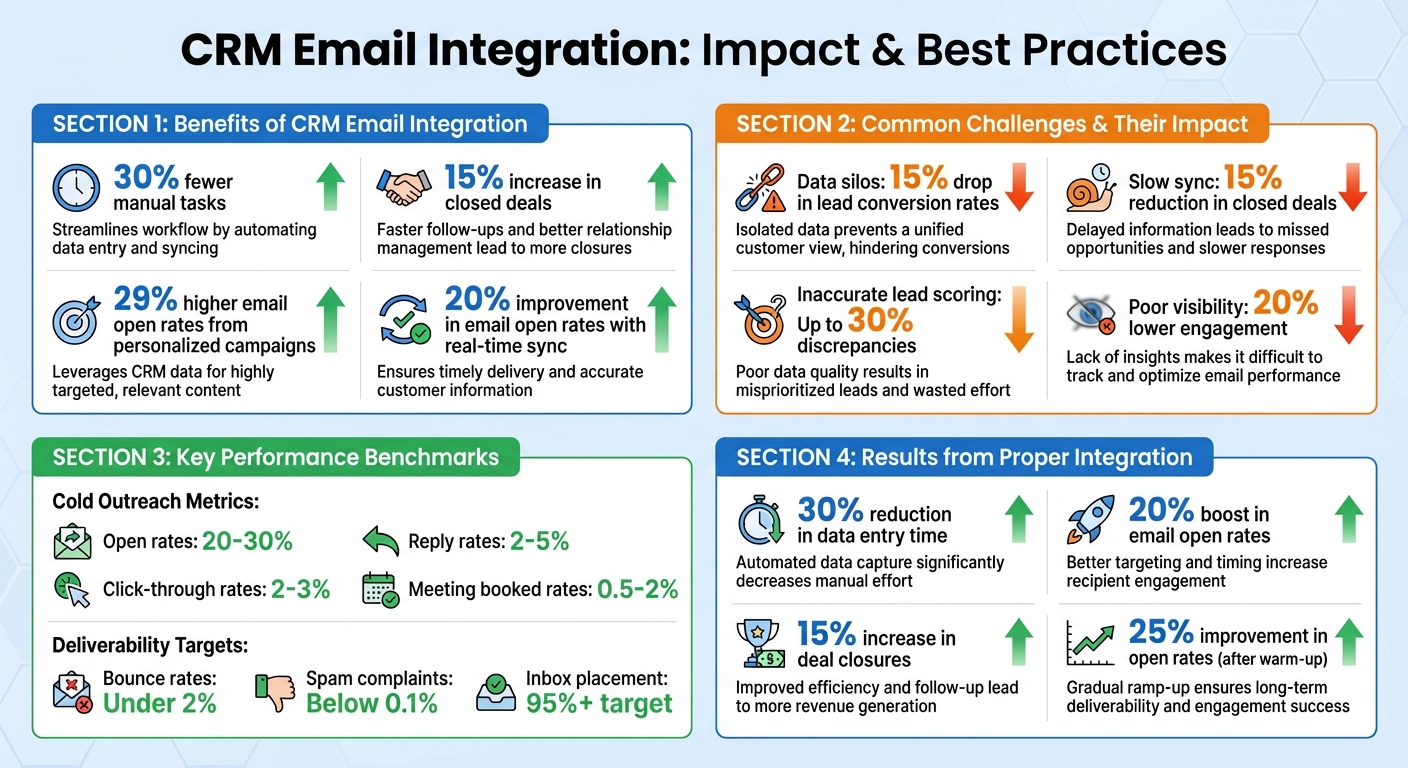
- 30% fewer manual tasks
- 15% increase in closed deals
- 29% higher email open rates from personalized campaigns
However, common challenges like data silos, sync delays, and limited engagement tracking often get in the way. Tools like Salesforge offer solutions with features like AI-driven personalization, multi-mailbox management, and real-time syncing to simplify integration and improve performance.
Key steps to improve CRM email integration:
- Standardize and clean up data fields to avoid sync errors.
- Enable two-way, real-time syncing for accurate updates.
- Use AI tools for personalized outreach and better tracking.
- Monitor metrics like reply rates and deliverability to refine strategies.
CRM Email Integration Benefits and Key Metrics
Common Challenges in CRM Email Integration
CRM-email integration can transform workflows and enhance revenue opportunities, but it’s not without its hurdles. Businesses often encounter three major challenges when connecting their CRM to email tools. These obstacles can disrupt workflows, obscure engagement metrics, and lead to missed opportunities.
Data Silos and Disconnected Systems
When customer data is scattered across different platforms - like Salesforce for leads, Mailchimp for campaigns, and Google Sheets for notes - it becomes nearly impossible to get a full picture of the customer journey. For instance, a prospect might respond to an email on one platform, but that response never makes its way into the CRM. One small business dealing with such fragmentation reported a 15% drop in lead conversion rates because their teams spent hours manually piecing together data instead of focusing on selling.
The issue becomes even more pronounced with multi-channel outreach. Replies coming in from email, LinkedIn, or multiple inboxes can easily get lost without a centralized system. Tools like Salesforge's Primebox™ are designed to address this by consolidating all replies - even from different email addresses - into one unified inbox, ensuring no opportunity is overlooked. But even with such tools, delayed syncing remains a significant challenge.
Slow or Inconsistent Data Sync
One-way integrations or delays in syncing can create a critical disconnect between email activity and CRM updates. Imagine a prospect opens an email at 9:00 AM, but the CRM doesn’t reflect this until noon. By the time the sales team is ready to follow up, the moment of peak interest has passed. This timing gap can lead to a 15% reduction in closed deals because teams are working with outdated information.
Many platforms only sync data hourly, leaving teams to manually update records or rely on stale information. This lag can lead to inaccuracies, where the CRM shows no engagement even when active conversations are happening. Such discrepancies can throw off lead scoring by as much as 30%. These syncing delays not only slow down workflows but also make it harder to track overall email engagement effectively.
Poor Visibility into Email Engagement
Most CRMs are equipped to handle one-to-one email tracking but often fall short when it comes to high-volume campaigns or multi-mailbox setups. Metrics like opens, clicks, replies, and bounces frequently go untracked, leaving teams in the dark about what’s working and what isn’t.
Tim Savage, CEO at Net New Solutions, shared his experience: "Once I had it set up and was sending, I saw excellent open rates with high deliverability. But when I saw the high number of opened emails, I was able to hone in on my calling campaigns even further."
This kind of actionable insight is only possible with proper tracking - something fragmented systems often fail to deliver. Without engagement data feeding back into the CRM, sales teams can’t effectively segment prospects, refine their strategies, or catch deliverability issues that could harm their sender reputation. Businesses lacking this visibility often see 20% lower engagement and miss key nurturing opportunities that could boost conversions. Addressing these visibility gaps is critical to unlocking the full potential of CRM-email integration.
Best Practices for CRM Email Integration
Once you've identified the challenges, the next step is to implement solutions that establish a seamless, automated connection between your CRM and email systems. The aim is straightforward: every email interaction - whether sent, opened, clicked, or replied to - should automatically update the relevant contact record in your CRM. Here’s how you can streamline the integration process and make your outreach more effective.
Standardize Data Models and Fields
Start by tidying up and standardizing your data. Mismatched fields - like using "CEO" in one system but "Chief Executive Officer" in another - can lead to sync errors and unreliable reporting. To avoid this, create a shared data dictionary that outlines each field's name, purpose, and allowed values across both systems.
Focus on key fields that are critical for outreach, such as contact status (e.g., New, Attempting, Connected, Disqualified), lifecycle stage (Lead, MQL, SQL, Opportunity, Customer), campaign source, and engagement metrics like "Last Email Sent", "Last Open Date", and "Last Reply Date". For instance, if your CRM uses "Meeting Booked" but your email platform logs "Booked Meeting", automation rules could fail, leading to inconsistent pipeline reports.
A practical next step is to audit your current fields, consolidate duplicates (e.g., merging "C.E.O." and "CEO"), and restrict who can create new fields. For example, a US-based SaaS company reduced sync issues by requiring RevOps team approval before adding new campaign source values to their system. Once your fields are standardized, set up a two-way sync to ensure data updates in real time.
Set Up Two-Way Data Sync
For high-volume outbound outreach, real-time bidirectional sync is essential. This ensures changes flow seamlessly between systems. For example, when a prospect replies to an email, that activity is logged in their CRM contact record. Similarly, if a lead progresses to "Opportunity" in your CRM, they’re automatically removed from cold email sequences.
Configure your integration to sync key activities like email sends, opens, clicks, replies, bounces, and unsubscribes back to the CRM, ensuring they’re tied to the correct contact and deal. Set a near real-time sync schedule (every 5–10 minutes) for critical engagement data, and keep an eye on API usage limits. Companies using real-time sync have reported up to a 20% improvement in email open rates, as their teams can act on engagement signals while prospects are still engaged.
Use AI-Powered Tools Like Salesforge
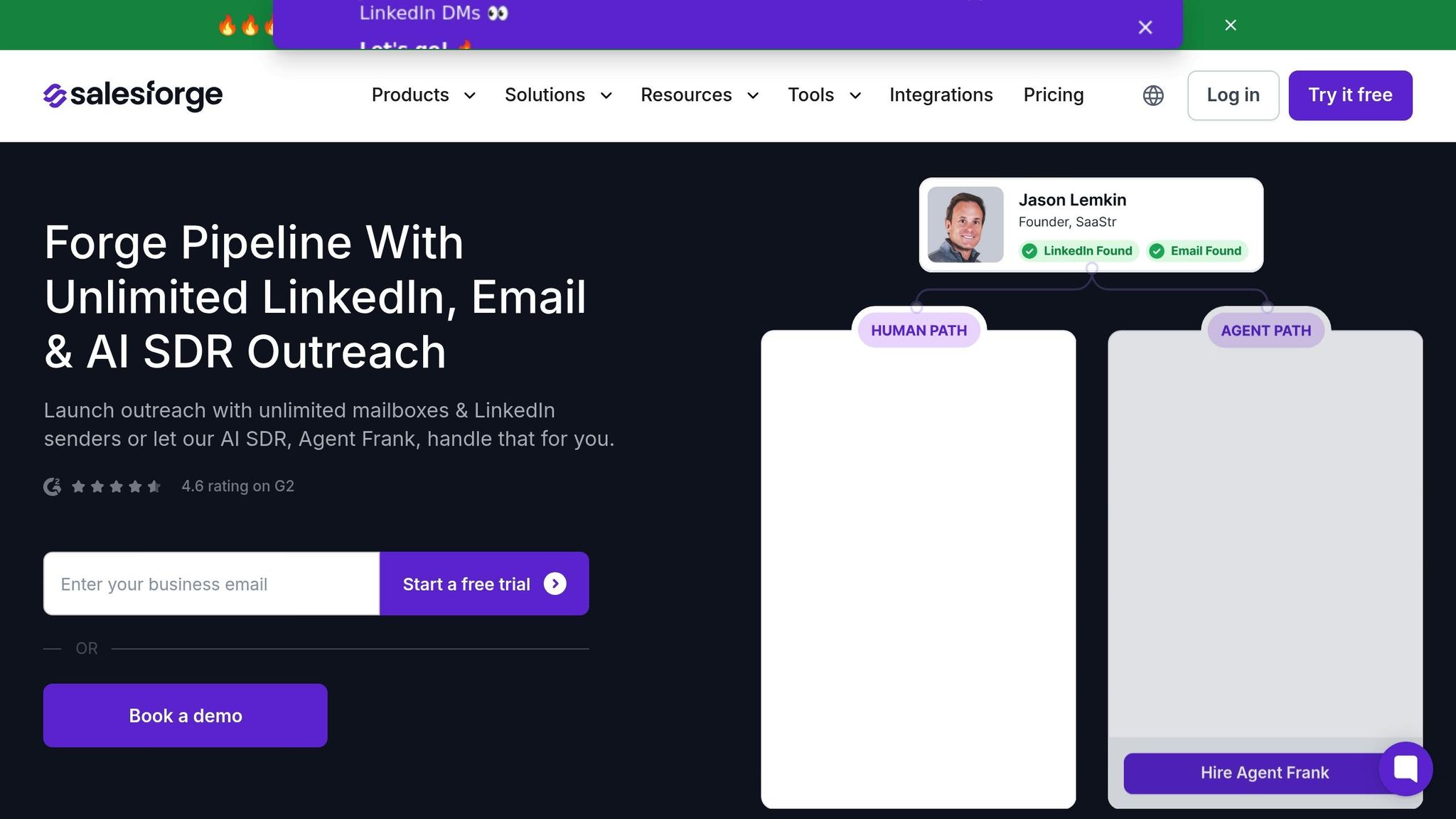
AI platforms like Salesforge can simplify integration by directly connecting your CRM to email systems. Salesforge integrates with CRMs like Salesforce and HubSpot - or connects via Zapier, webhooks, and APIs - to pull lead lists and ideal customer profiles (ICPs). It then uses AI to generate personalized cold emails at scale.
Salesforge’s AI assistant, Agent Frank, automates the entire outbound process: from prospecting and crafting tailored messages to sending emails, following up based on engagement, and booking meetings. It also logs every activity back to your CRM, ensuring accurate pipeline tracking. For example, VAI Consulting leveraged Agent Frank to book three calls in a single week, while UniteSync achieved an 85.26% positive reply rate and a $2.86 customer acquisition cost using Salesforge’s domain setup, inbox warming, and AI personalization alongside their CRM data.
Salesforge also addresses common integration issues like deliverability and data quality. Built-in email validation filters out invalid contacts before they clutter your CRM, while its Warmforge feature improves sender reputation to keep emails out of spam folders. Additionally, Primebox™ consolidates all replies into a single inbox, ensuring no response is missed and every conversation syncs back to the correct CRM record.
Using CRM Data to Improve Email Performance
When your CRM and email systems are synced, you gain a powerful tool to refine your outreach. This integration provides a clear picture of what's working and what needs improvement, allowing you to fine-tune your strategies in real time. With this data-driven approach, you can enhance follow-up sequences, personalize messages, and improve email deliverability.
Track Key Metrics for Follow-Up Sequences
To understand how your emails are performing, keep an eye on metrics like open rates, reply rates, click-through rates (CTR), and meeting bookings. For cold outreach, benchmarks include 20–30% open rates, 2–5% reply rates, 2–3% CTR, and 0.5–2% meeting booked rates. When your CRM automatically logs email interactions, it becomes easier to identify patterns. For instance, if your open rate is a solid 25% but reply rates are only 1%, it might indicate that your subject lines are effective, but the email content isn’t resonating.
Your CRM dashboard can also help pinpoint where prospects drop off in your sequences. For example, if 40% of recipients open your first email but don’t reply, it might be time to experiment with new messaging or adjust the timing of your follow-ups. One team running a trade show follow-up noticed a 25% open rate but only 1% replies. By personalizing their emails - referencing webinar attendance and including lines like "Following up on your interest in our demo" - they increased reply rates to 4% and booked three meetings from just 100 leads.
Apply AI to Personalize Outreach
AI tools like Salesforge take personalization to the next level by using CRM data to craft tailored emails at scale. These tools analyze engagement history, prospect behavior, and firmographics to create unique messages for each lead. Instead of relying on generic templates, AI can pull details like past email opens, clicks, or even LinkedIn activity to make your outreach more relevant. This can boost reply rates by up to 30% compared to one-size-fits-all templates.
Agent Frank is another AI tool that automates data extraction, adjusts follow-ups based on engagement, and refines messaging dynamically. For instance, if a prospect clicks a link about pricing but doesn’t respond, Agent Frank might follow up with an email addressing common pricing questions. While personalization is essential, ensuring your emails actually land in the inbox is equally critical.
Monitor and Improve Deliverability
Even the most personalized email won’t make an impact if it ends up in the spam folder. Use your CRM to track bounce rates (keep them under 2%), spam complaints (below 0.1%), and inbox placement rates (aim for 95% or higher). Poor deliverability can distort your metrics - low open rates might not mean your subject lines are ineffective but could indicate emails are being flagged as spam.
Tools like Warmforge, included with Salesforge, can automate the email warm-up process. By gradually increasing send volumes over 2–4 weeks and mimicking human sending patterns, these tools help build a strong sender reputation. For example, one sales team initially experienced a 15% bounce rate after skipping the warm-up process. After integrating Warmforge, their bounce rate dropped to 1.2%, open rates improved by 25% in 30 days, and meeting bookings increased by 15%. With your CRM tracking performance for each mailbox, you can rotate underperforming addresses to maintain strong deliverability. Improving this final step ensures your outreach efforts reach their intended audience and maximizes the benefits of CRM integration.
Choosing the Right Tools for CRM Email Integration
Check CRM Compatibility and Features
Before diving into CRM email integration, make sure your email tool plays nicely with your CRM - whether it’s Salesforce, HubSpot, Zoho, or Pipedrive. Whether you're using a native integration or a connector like Zapier, it’s crucial that the tool supports two-way sync and detailed field mapping. This allows for advanced personalization, making your outreach more effective. For businesses managing high-volume cold outreach, relying solely on the built-in email features of a CRM may not cut it. A dedicated platform that integrates seamlessly with your CRM is often a better option.
Field mapping is particularly important because it lets you use custom CRM attributes to fine-tune your personalization efforts. Companies that implement automation and CRM-email integration often see a 30% reduction in time spent on data entry and a 20% boost in email open rates. Once you’ve confirmed compatibility, focus on tools that balance sending strategies with strong deliverability features and multi-mailbox management.
Prioritize Deliverability and Multi-Mailbox Management
For outbound teams in the U.S. handling large-scale outreach, multi-mailbox support is a must. By connecting multiple domains and inboxes, you can spread out your send volume, protect your sender reputation, and stay within the sending limits of various email providers. The best platforms allow unlimited mailbox connections and provide a unified inbox view, enabling team members to manage replies from multiple accounts without jumping between tabs.
Deliverability is another critical factor. Look for tools offering automated warm-up, email validation, and spam checks to ensure your emails land in the main inbox rather than the spam folder. For example, Salesforge includes features like Warmforge, which handles unlimited warm-up and validation, along with multi-mailbox management - all from a single interface. These capabilities help maintain inbox placement rates above 95%. Additionally, compliance with regulations like CAN-SPAM is easier with these built-in safeguards. Pairing technical integration with AI enhancements can elevate your outreach strategy even further.
Consider AI Outreach Platforms
If cold outreach is a cornerstone of your growth strategy, AI-powered platforms can lighten the load by automating tasks like prospecting, copywriting, follow-ups, and even meeting bookings. These tools complement CRM integrations by streamlining outreach and boosting efficiency. Businesses using AI-driven personalization report 29% higher open rates compared to generic emails, and those implementing AI-based lead scoring see about a 15% increase in deal closures.
Take UniteSync, for instance. They achieved an 85.26% positive reply rate and a customer acquisition cost of just $2.86 by using tools like Salesforge, Mailforge, and Warmforge to onboard 4–5 new music creators daily. Similarly, VAI Consulting leveraged Agent Frank to automate outreach, booking three calls in just one week. When evaluating AI platforms, ensure they log all key actions - like emails sent, replies received, and meetings scheduled - back to your CRM. This ensures you can track their impact on your pipeline and attribute revenue accurately. The right tools don’t just solve integration headaches; they transform cold outreach into a scalable, data-driven process.
Conclusion
Tackling issues like data silos, sluggish syncing, and limited visibility into engagement doesn’t have to be overwhelming. By standardizing data models, implementing two-way sync, and selecting tools that emphasize deliverability and automation, you can turn disjointed workflows into streamlined, automated systems. Businesses that adopt this approach report 30% less time spent on data entry, 20% higher open rates, and 15% more closed deals. These improvements lay the groundwork for a strong and efficient outbound strategy.
AI platforms such as Salesforge, with features like Warmforge and Agent Frank, take automation to the next level by handling prospecting, personalization, follow-ups, and real-time CRM updates. This integration simplifies your outreach process from start to finish. Start by ensuring compatibility between your tools, enabling real-time two-way syncing, and keeping a close eye on engagement metrics like open rates, reply rates, and deliverability. Use your CRM data to power AI-driven personalization, segment audiences based on behavior, and fine-tune your sequences over time. When your tools work together seamlessly, cold outreach evolves into a scalable and measurable strategy that delivers results.
Routine audits and data-driven adjustments keep your system running smoothly. With the right tools and practices in place, you’ll spend less time dealing with disconnected platforms and more time focusing on what matters most - closing deals.
FAQs
What are the key advantages of connecting your email with a CRM system?
Integrating your email with a CRM system can completely change the way you handle sales and outreach. For starters, it allows for easy tracking of all communications, so you never lose sight of a lead or miss an important interaction. By bringing conversations and data into one place, it simplifies lead management, helping you focus on the prospects that matter most.
This integration also ramps up outreach efficiency by automating repetitive tasks like follow-ups and enabling personalized messaging on a larger scale. Plus, it improves email deliverability by keeping your contact lists clean and verified. On top of that, the system provides in-depth analytics, giving you the insights needed to fine-tune your sales strategies. For teams using AI-driven tools, this setup is a game-changer, making it possible to scale personalized communication without losing that human element.
How do AI tools improve CRM email integration?
AI tools make CRM email integration much easier by improving email deliverability, automating personalized outreach on a larger scale, and simplifying follow-up tasks. They also analyze response patterns to deliver actionable insights, enabling teams to fine-tune their communication strategies for better results.
Platforms like Salesforge push this even further with AI-powered features like automated lead generation, tailored messaging, and tools to manage multiple mailboxes effortlessly. These advancements not only save time but also help teams engage with prospects more effectively.
What are the biggest challenges with CRM email integration, and how can they be solved?
Integrating email with a CRM system comes with its fair share of hurdles. Common issues include ensuring emails bypass spam filters to reach inboxes, efficiently managing multiple email accounts, and accurately tracking responses.
To tackle these challenges, tools like Warmforge can help improve email deliverability by warming up accounts and minimizing the chances of emails being marked as spam. For streamlined management, platforms that consolidate replies from various channels - like email and LinkedIn - make response tracking much more manageable. On top of that, AI-driven tools, such as an AI SDR, can automate outreach efforts. These tools handle tasks like lead generation, personalized follow-ups, and even scheduling meetings, saving time while boosting overall engagement.